NotebookLM alternative for studying: from your material to a study plan

In short: Since July 2026, NotebookLM has been called Gemini Notebook. It's Google's AI research tool: you upload sources and ask questions about them. Learngine is a study programme: your own material becomes learning objectives, topics, exercises and a study plan up to the exam, plus a coach who knows your material. For university and school. If you want to understand and summarise sources, Gemini Notebook serves you well. If you're studying for an exam, Learngine gives you the path to get there.
The comparison at a glance
| Learngine | Gemini Notebook (formerly NotebookLM) | |
|---|---|---|
| Built for | Study programme for exams at university and school | AI research tool, described by Google as a "thinking partner" |
| What you work from | Your own study material, your textbook and your own notes: slides, lecture notes, worksheets, notes taken in class, book chapters | Your own sources, which you load into a notebook |
| Structure | Learning objectives, then topics, then exercises. Everything belongs to a topic | Notebooks with sources and chat |
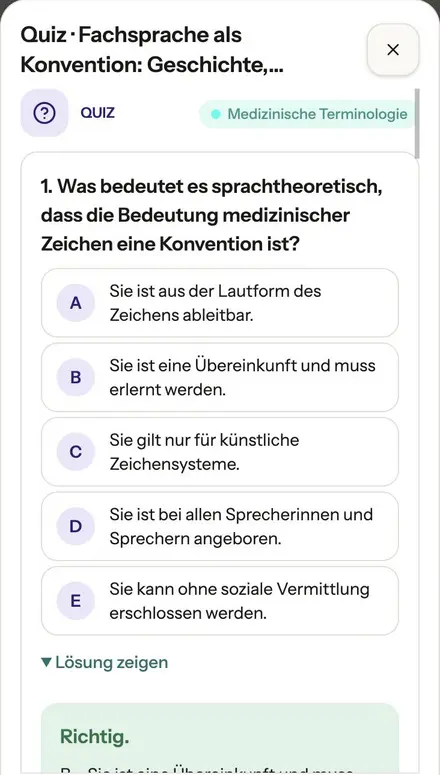
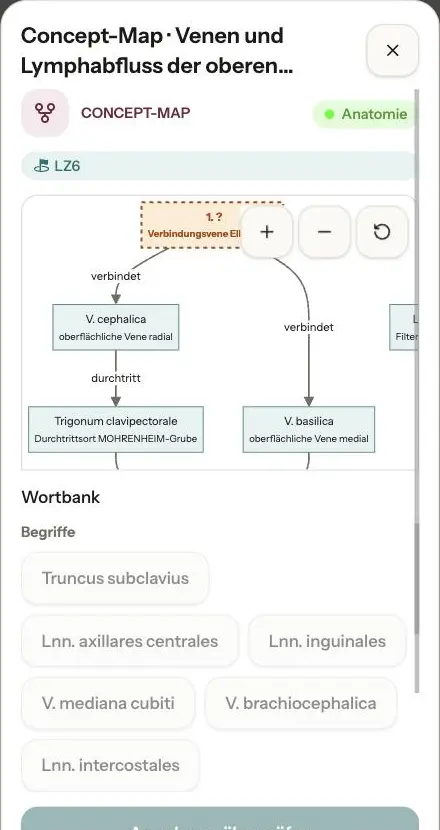
| Exercises | Flashcards, quiz, abstract, diagrams, concept map, image exercises, key terms, podcast, practice exam and tests | Flashcards, quizzes and reports |
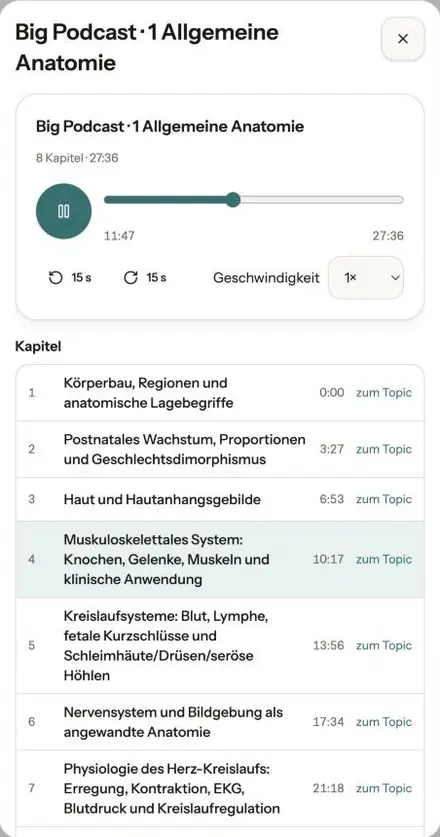
| To listen to and watch | A podcast for each topic with chapters and a jump to the topic, offline too | Audio and video overviews |
| Help with questions | The agent "Coachi" explains things in the context of the topic you're currently studying, using your own material | Chat with your sources |
| For under-18s | A separate learning path for school, with parental consent and content safeguards | For all age groups, some features only from 18 |
| Data | Your data is stored in the EU. No AI training with your material. (Details in the privacy policy) | According to Google, no training with your data unless you give feedback. Details in Google's notices |
As of 11 November 2026. Subject to change. Information about Gemini Notebook from Google's help pages, accessed 11 November 2026. Both providers' features may change.
What a study programme adds
The following points describe Learngine.
From material to learning objective. Learngine reads your material page by page, finds the learning objectives and builds topics from them. Every card, every quiz question and every podcast belongs to a topic. For each topic, you can see what you already know and what's still missing.
Lumi plans up to the exam. You add your exam. Lumi creates your study plan just for you, spreads the topics over the days until the date and tells you what's up today. You can sync the study blocks with your calendar.
Review until it sticks. Exercises come back when they're due. Anything you didn't know comes back sooner.
A practice exam like the real thing. Coachi puts together a practice exam from your own material, in your university's format: with a cover sheet, question booklet, answer sheet and timer. The multiple-choice questions follow the recognised rules for exam questions (IMPP, NBME). If you have past papers, the practice exam takes its cue from them.
Your notes count too. Whatever you wrote in the margin in class or in the lecture is read and ends up on the card as a memory aid.
Two learning paths. One for university, organised by degree programme, semester, modules and exams. One for school, organised by school, year and subjects, with the subjects from the curriculum if you like.
Safe for school students, clear for parents. Under 18, every account needs a parent's consent. For school accounts, Learngine checks every upload and every chat message before anything is processed. Learngine is not a public chat platform: there's no search for other users, and only people who have been actively invited and have the group's code can join a study group. Everything about this is on the Safe learning page.
Import plans instead of typing them up. Upload your timetable, curriculum or semester schedule, even as a photo or handwritten. Learngine reads out subjects, courses and dates, and you confirm the result.
Two agents in your messenger. You connect Lumi and Coachi once in your profile with Telegram. Lumi tells you what's up today. Coachi answers subject questions and sends you suitable exercises.
Anki, study groups, your own drive. Cards can be exported to Anki, and existing decks imported. In study groups, you share material and exercises, while your notes and progress stay with you. Your material lives in the Learngine Cloud Drive, with Google Drive sync if you like.
Premium AI, billed fairly. For demanding tasks, Learngine uses an AI model with top quality, for example Claude Opus 5 and DeepSeek Pro 4. This costs credits, and every week some credits are included in your plan, even on Free. Learning, practising, flashcards and your study plan never need credits.
The modern kind of app. Learngine is a web app. You open it in your browser and add it to your home screen with two taps, on your phone or computer. You always have the latest version, and your progress is the same on every device.
No ads, data in the EU. Learngine shows no ads on any plan and doesn't sell data. Your data is stored in the EU. Your material is not used to train AI models.
Which suits whom
| You … | Then the better fit is |
|---|---|
| are studying for a specific exam, test or class test | Learngine |
| want a study plan that tells you what's up today | Learngine |
| want a practice exam built from your own material | Learngine |
| are a school student or parent and want clear safety rules | Learngine |
| study with Anki and want to take your cards with you | Learngine |
| want to query and summarise sources for an essay or term paper | Gemini Notebook |
| already work with Google Docs and want to ask questions about your documents there | Gemini Notebook |
You can also use both: research with Gemini Notebook, study for the exam with Learngine.
How to try Learngine
- Upload material. Take your next topic, ideally with your notes on it.
- Check the learning objectives. Learngine shows you the learning objectives and topics. You confirm what's right.
- Practise. Flashcards, quizzes and the other exercises are ready. Lumi schedules them up to the exam.
Frequently asked questions
Is NotebookLM now called Gemini Notebook?
Yes. Google renamed NotebookLM to Gemini Notebook in July 2026. It's the same product, and old links redirect.
Can Learngine replace NotebookLM?
For studying for an exam, yes: Learngine turns your material into exercises and a study plan. For research across many sources, for example for a term paper, Gemini Notebook is the better tool. Many people use both.
Can Learngine make podcasts from my material?
Yes. Every topic gets a podcast with chapters that you can listen to offline too. Each chapter leads straight to the matching topic.
Is Learngine free?
Yes, the Free plan is free and has no time limit. Uploading material, learning objectives, topics, daily exercises, study groups and Anki export are included. Practice exams and more podcasts come with the paid plans. Student costs €7.99 a month, €39 per semester (6 months) or €69 a year. Student Pro costs €14.99 a month, €69 per semester or €129 a year. All prices include VAT, as of 11 November 2026. Current prices are at learngine.de/preise.
Do I need a Google account for Learngine?
No. You can simply sign up with your email address. If you like, you can also use your Google account. You can connect Google Drive, but you don't have to.
What happens to my material?
It's stored in the EU and only processed to create your exercises. It isn't used to train AI models, and you can delete it at any time.
Can I use Learngine for school too?
Yes. There's a separate learning path for school with your school, year and subjects. Under 18, parental consent is required, and uploads and chats are checked for unsuitable content. More about this on the Safe learning page.
Sources
- Google Workspace Admin Help: Gemini Notebook: renaming, features, age limits, data handling. Accessed 11 November 2026.
- Google Help: Gemini Notebook with a work or school account: product name, training with user data. Accessed 11 November 2026.
- notebook.google: self-description as an AI research tool and "thinking partner". Accessed 11 November 2026.
- Learngine: Pricing, Safe learning, Privacy.
Learngine. As of 11 November 2026. Subject to change. NotebookLM and Gemini are trademarks of Google LLC. Learngine is not affiliated with Google.
More from Knowledge
- StudySmarter alternative: studying with your own material
- AI study tools compared: which ones turn your notes into flashcards, quizzes and a study plan?
- Learning with podcasts: when they really help and why your own material makes the difference
- A study plan for exam season: how to spread preparation for several exams across a few weeks
All articles on study methods and guides for university and school